

BlackHole Simulation

About
BlackHole Simulation is an interactive model of the impact of a black hole's gravitational field on the light received by the observer. The user can customise numerous parameters, such as the number of stars, the radius of the stars, the quality of the accretion disc, etc., to explore this complex astrophysical phenomenon visually.
My role
I worked alone on this project, coding the entire simulation and its optimisation. I developed the algorithms for calculating light trajectories, the dynamic management of memory resources and the custom 2D rendering of objects. I also set up a pooling system to improve performance and minimise the impact on memory.
Project objective
This project was designed as part of my Bac2 Q1 mathematics exam at the Haute École Albert Jacquard college. The aim of the exam was to get us to apply complex equations of motion. I chose to go further by creating a complete scientific simulation to deepen my knowledge of algorithms, mathematics and physics.
Main features
-
2D simulation on a canvas with dynamic rendering of meshes calculated in real time
-
Navigation around the black hole with perspective calculations to simulate a 3D effect through size variation
-
Advanced settings: number of stars, display of accretion discs, black hole positioning, etc.
-
Calculations based on physical models and data from NASA and other scientific references
-
Manual memory management for dynamic mesh creation, optimised to prevent leaks
Technologies used
-
Unity 2022.3
-
C# language
-
3D simulated on a 2D canvas
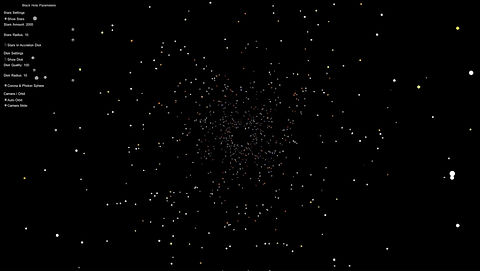

Examples of different settings to visualise different visual aspects of black holes and their impact on the perception of light.
Challenges and solutions
The main challenge was to manage memory and performance efficiently, since all the meshes are calculated dynamically in the code. I had to manually implement resource freeing and an object pooling system to ensure that the simulation ran smoothly in real time. These optimisations required a great deal of thought about memory management in a context where Unity's garbage collector does not apply.
The first version of the project ran at between 5 and 10 fps with a low parameter configuration. The current version runs at an average of 60 to 120 fps with an average parameter setting.
What this project shows about me
This project is a testament to my motivation and my taste for ambitious challenges. It also reflects my ability to learn independently, to deepen my scientific and technical knowledge, and my sense of optimisation and rigour in coding.
Personal reflection and learning
I learned a lot about fine-tuned memory management and optimising calculations in real time. This project also made me aware of the importance of a methodical approach to design and development, which now has a positive influence on the way I work on other complex projects.
Links / Download
At the moment, the simulation is not available for public download. I plan to integrate an interactive user interface that is more instinctive and easy to use, to make the experience even more accessible and immersive. I'd also like to look even further into optimisation, with the aim of making the simulation as fluid as possible, whatever the parameters used.